KODAK SOFTDENT Software
Before attempting the linking procedure, you must be aware that there are two options in the process of integration between the Florida Probe and SOFTDENT. SOFTDENT requires you to purchase a 3rd Party Integration license to use any 3rd party software, including Florida Probe. To see if you already purchased this, within your SOFTDENT program, go to About SOFTDENT: License Details.
Option One allows you to use the Florida Probe software and hardware to perform a Periodontal Exam, SOFTDENT will transfer the necessary parameter to FP32 where you may start the exam. With this option you have the ability to print Florida Probe's Hi-Res Graphical Chart, Plaque Chart and other handouts available.
Option Two allows you to enter pocket Depth measurement directly to SOFTDENT using Florida Probe hardware to measure the pockets. With this option, you will not be able to print your exam data using Florida Probe Graphical Chart.
For more information regarding SOFTDENT, please visit their website.
Option 1
Step 1:
After starting SOFTDENT select 'Patients'

Step 2:
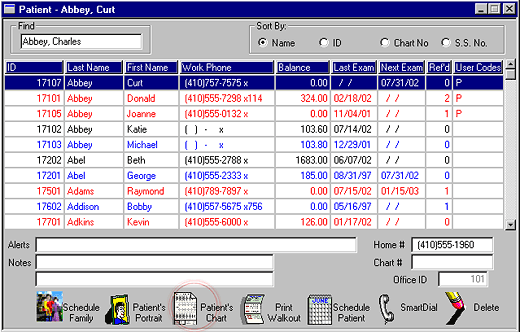
Select the name of the patient from the 'Patients List'
After selecting a patient, double-click the 'Patient's Chart' button.

Step 3:
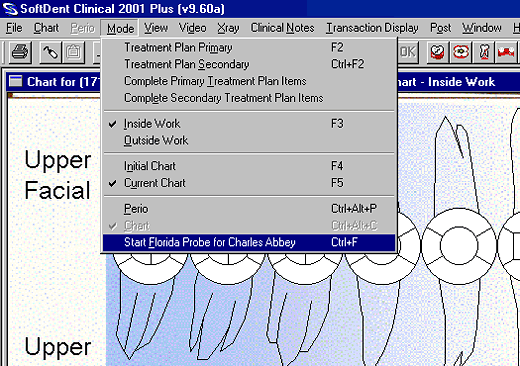
In the 'Mode' menu, select 'Start Florida Probe for Patient's name"
The Florida Probe software will be started and SOFTDENT will automatically transfer the minimum required patient information, you may start the Periodontal exam using FP32.

Option 2
Step 1:
After starting SOFTDENT select 'Patients'

Step 2:
Select the name of the patient from the 'Patients List'
After selecting a patient, double-click the 'Patient's Chart' button.
Step 3:
In the 'Mode' menu, select 'Perio'

Step 4:
In the 'Perio' menu, select 'Options'

Step 5:
Select the 'Florida Probe' from the 'Electronic Probe' section
Make sure the 'Comm Port' selected is correct.
Click 'OK'
You will now be able to start the exam using the Florida Probe hardware.


|